With VMware’s recent licensing changes, many enterprise data centers are looking closely at lightweight, KVM-based virtualization alternatives. One viable enterprise solution is HPE SimpliVity 6.2.0 powered by HPE VM Essentials (VME).
In my 16 years as an infrastructure engineer deploying servers and SAN fabrics, I have found that 90% of HCI deployment failures boil down to two things: sloppy physical/VLAN network segmentation andmisplaced quorum (Arbiter) architecture.
This guide condenses the entire deployment lifecycle—from pre-flight network planning to management server staging, node initialization, and automated OVC provisioning via VME Manager—with battle-tested field troubleshooting insights.
1. 2-Node Network Architecture & Golden Rules
A 2-node SimpliVity cluster delivers high availability at a modest footprint. However, if physical links and logical VLANs are not strictly isolated, storage I/O and federation handshakes will collide, leading to split-brain or degraded clusters.
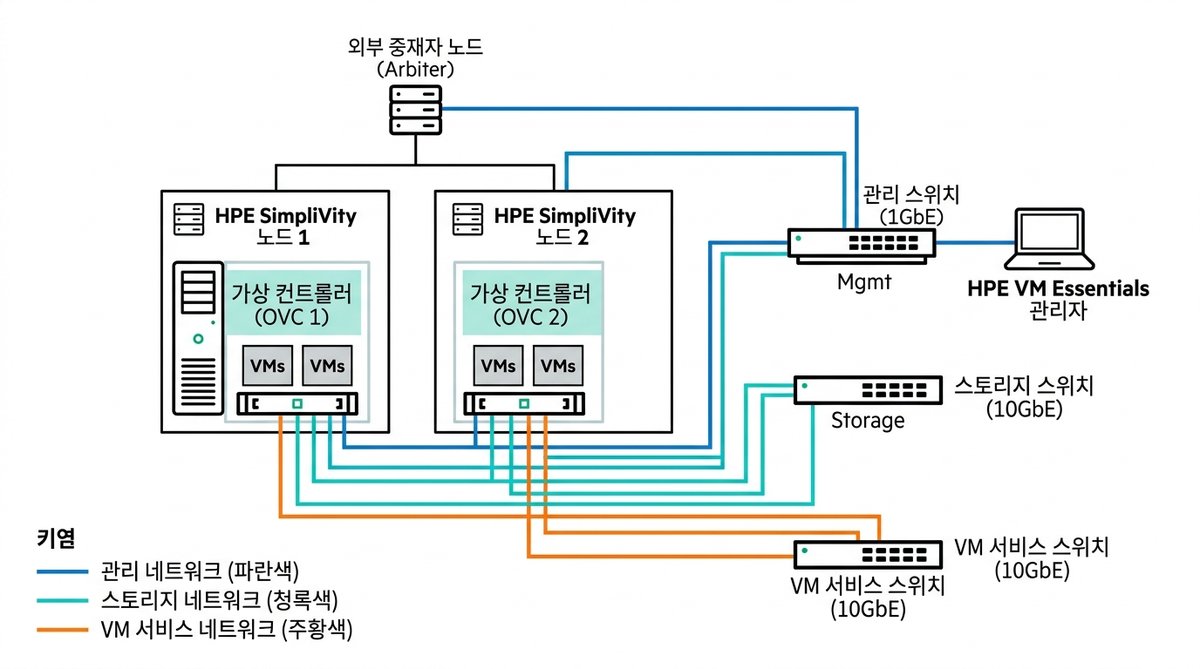
Five Mandatory Network Segments
| Segment | Bandwidth | MTU | Purpose & Practical Field Tips |
|---|---|---|---|
| 1. iLO Out-of-Band | 1 Gbps | 1500 | Dedicated out-of-band management & remote console (physically isolated switch recommended). |
| 2. Management | 1 Gbps / 10 Gbps | 1500 | Host BaseOS, VME Manager UI, and OVC control communications. |
| **3. Storage ** | **10 Gbps / 25 Gbps ** | 9000 (Jumbo) | [CRITICAL] Real-time node data mirroring. Must enable MTU 9000 end-to-end. |
| 4. Federation | 10 Gbps | 1500 | SimpliVity inter-OVC cluster metadata catalog & synchronization. |
| 5. VM Workload | 10 Gbps | 1500 | Production tenant VM service traffic (isolated customer VLANs). |
💡 Field Troubleshooting Note: Jumbo Frame (MTU 9000) Mismatch
If you set MTU 9000 on the host interface but forget to enable Jumbo frames on the upstream L2 top-of-rack switch port or SVI, packets will silently drop. If your OVC provisioning stalls at around 70-80%, check your storage switch MTU immediately.
2. End-to-End Workflow
flowchart TD
    A["Step 1. Pre-flight Planning & IP Matrix"] --> B["Step 2. Management Infra (NTP/DNS/NFS)"]
    B --> C["Step 3. Deploy VME Manager & Arbiter VM"]
    C --> D["Step 4. Node HVM BaseOS & Initial Setup"]
    D --> E["Step 5. VME Manager HVM Cluster & OVC Deploy"]
    E --> F["Step 6. Federation Sync & CLI Verification"]
3. External Management & Arbiter Quorum Setup
In a 2-node cluster, the Arbiter acts as an independent tie-breaker (quorum witness) to prevent split-brain scenarios when network connectivity between nodes degrades.
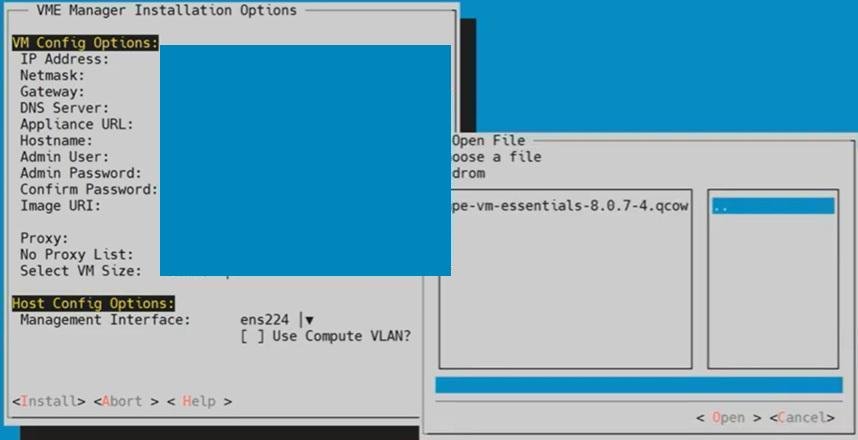
⚠️ Golden Rule for Arbiter Placement
- Never host the Arbiter VM inside the SimpliVity datastore it arbitrates.
- If a node fails and the Arbiter VM was on that crashed node, the surviving node loses quorum and storage services freeze immediately.
- Best Practice: Place the Arbiter on an independent 1U standalone management server, or a distinct third-party virtualization host outside the SimpliVity cluster.
Strict NTP Time Synchronization
Ensure all components (physical hosts, VME Manager, OVCs, Arbiter) sync with a rock-solid NTP source. If clock drift exceeds 5 seconds, TLS certificate handshakes and OVC federation authentication will fail.
4. Physical Node Setup: HVM BaseOS & Initial Setup
After rack mounting and cabling, boot the nodes via iLO Virtual Media to flash HVM 24.04 BaseOS.
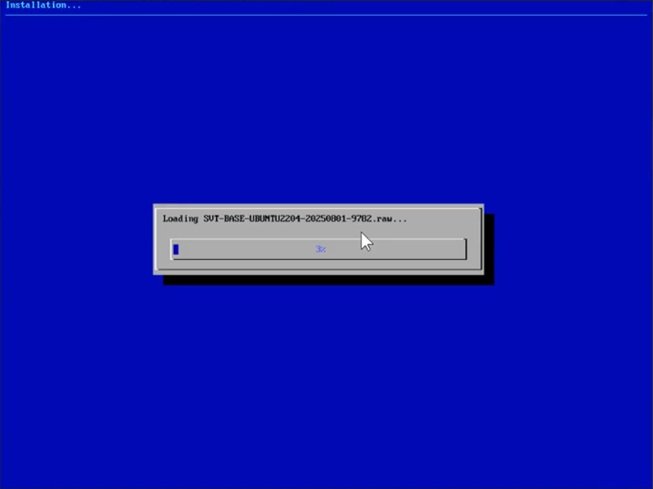
- iLO Virtual Media: Mount the HVM BaseOS ISO and execute a one-time boot installation.
- Initial Setup TUI:
- Log into the host console and run
initial_setup. - Configure hostname, management IP, default gateway, DNS, and NTP.
- Verify link status on 10G/25G physical adapters using
ethtoolbefore proceeding.
- Log into the host console and run
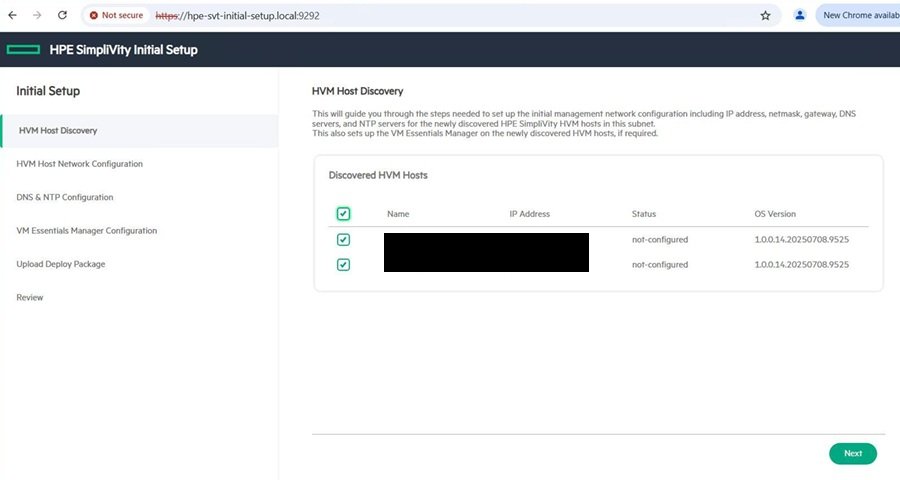
5. VME Manager: HVM Cluster Creation & OVC Auto-Deployment
Access the VME Manager web interface (https://<VME-Manager-IP>) to initiate the cluster deployment wizard.
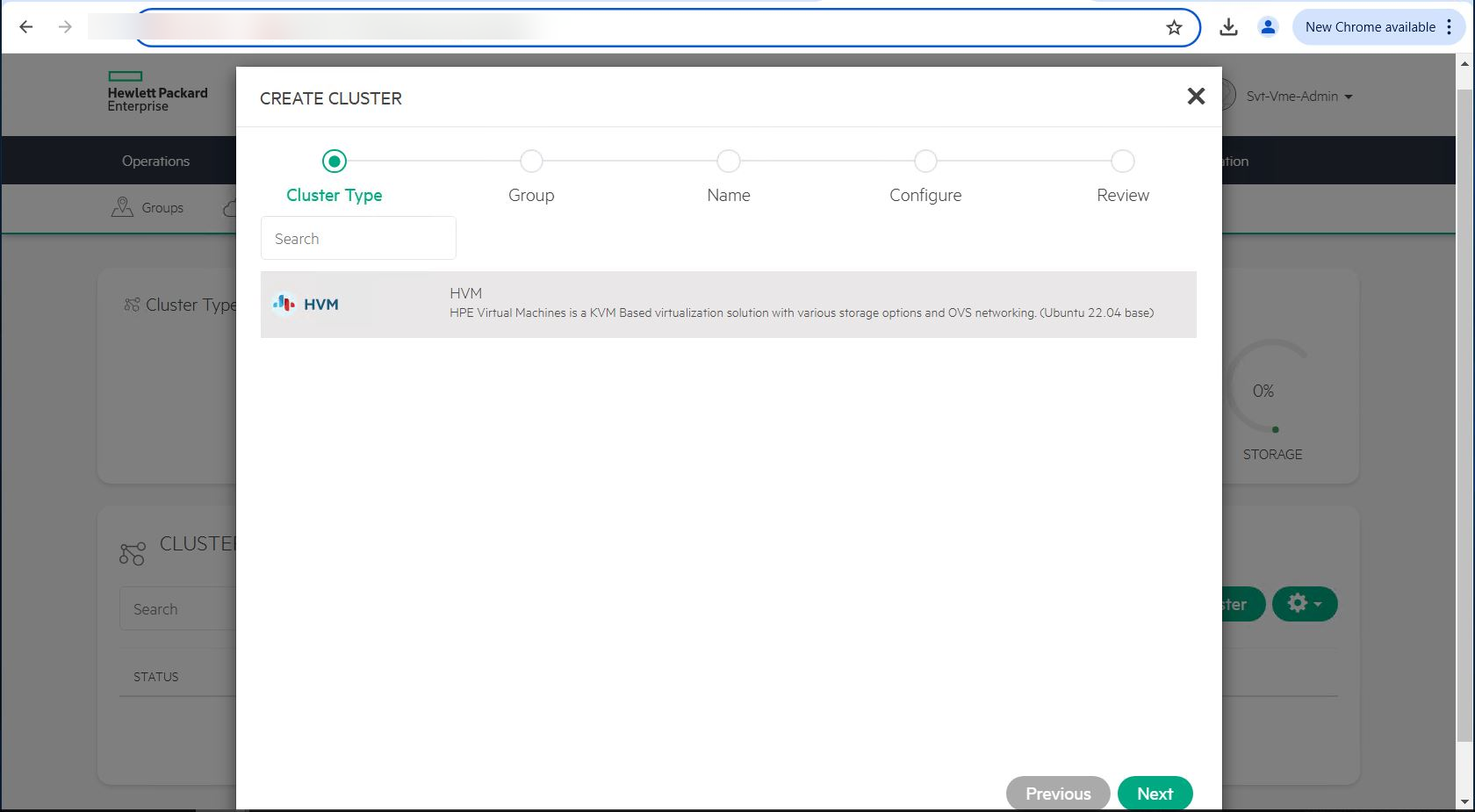
Key Deployment Wizard Parameters
- Cluster Type: Select
HVM Clusterand provide a descriptive name. - Host Selection: Discover and add the two physical nodes configured during
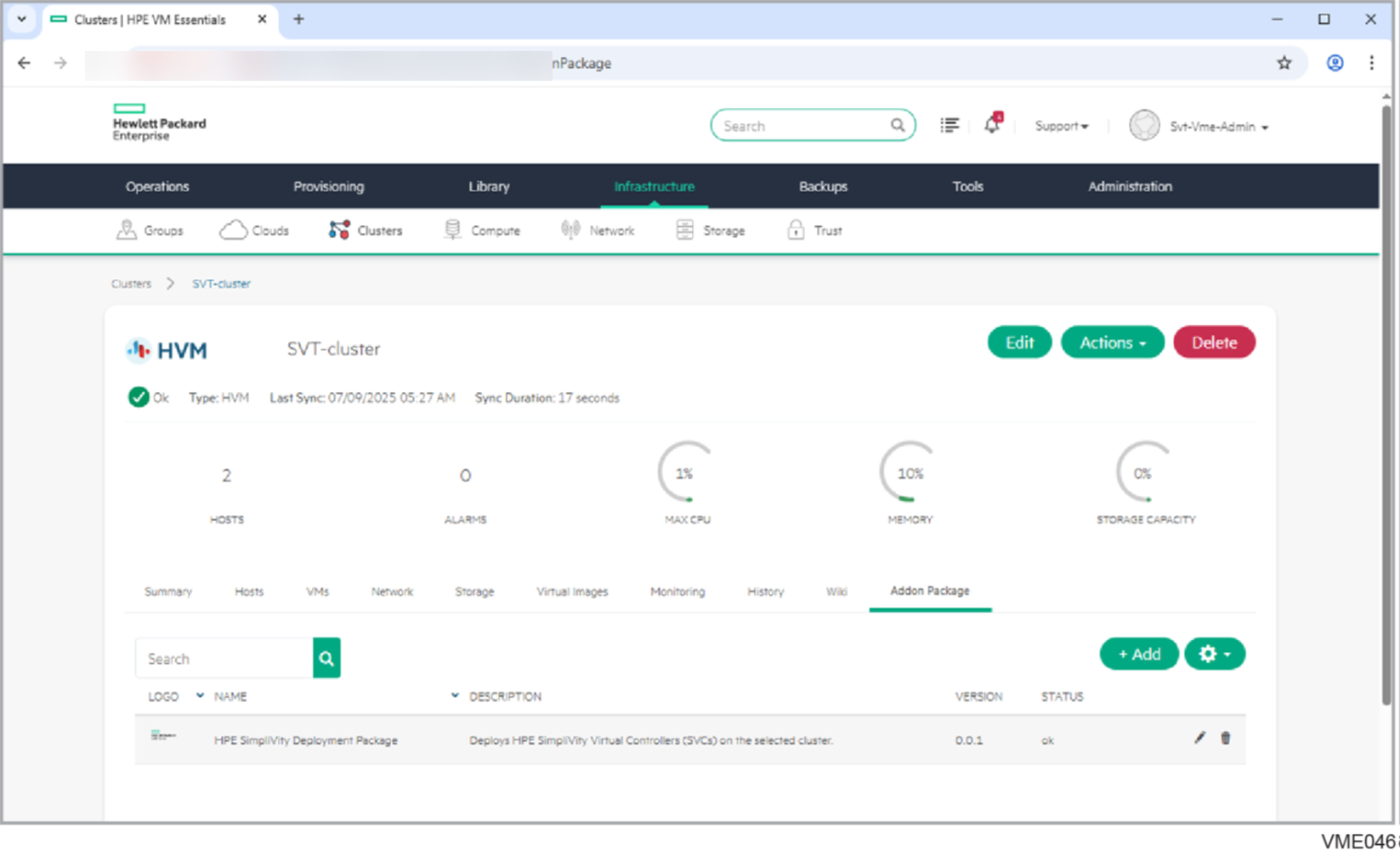
initial_setup. - SimpliVity Add-on:
- Select SimpliVity 6.2.0 package.
- Allocate dedicated OVC Management, Storage, and Federation IPs.
- Provide the Arbiter IP and root credentials.
- Automated Provisioning:
- OVC template rollout, interface binding, Corosync cluster setup, and storage datastore initialization proceed automatically.
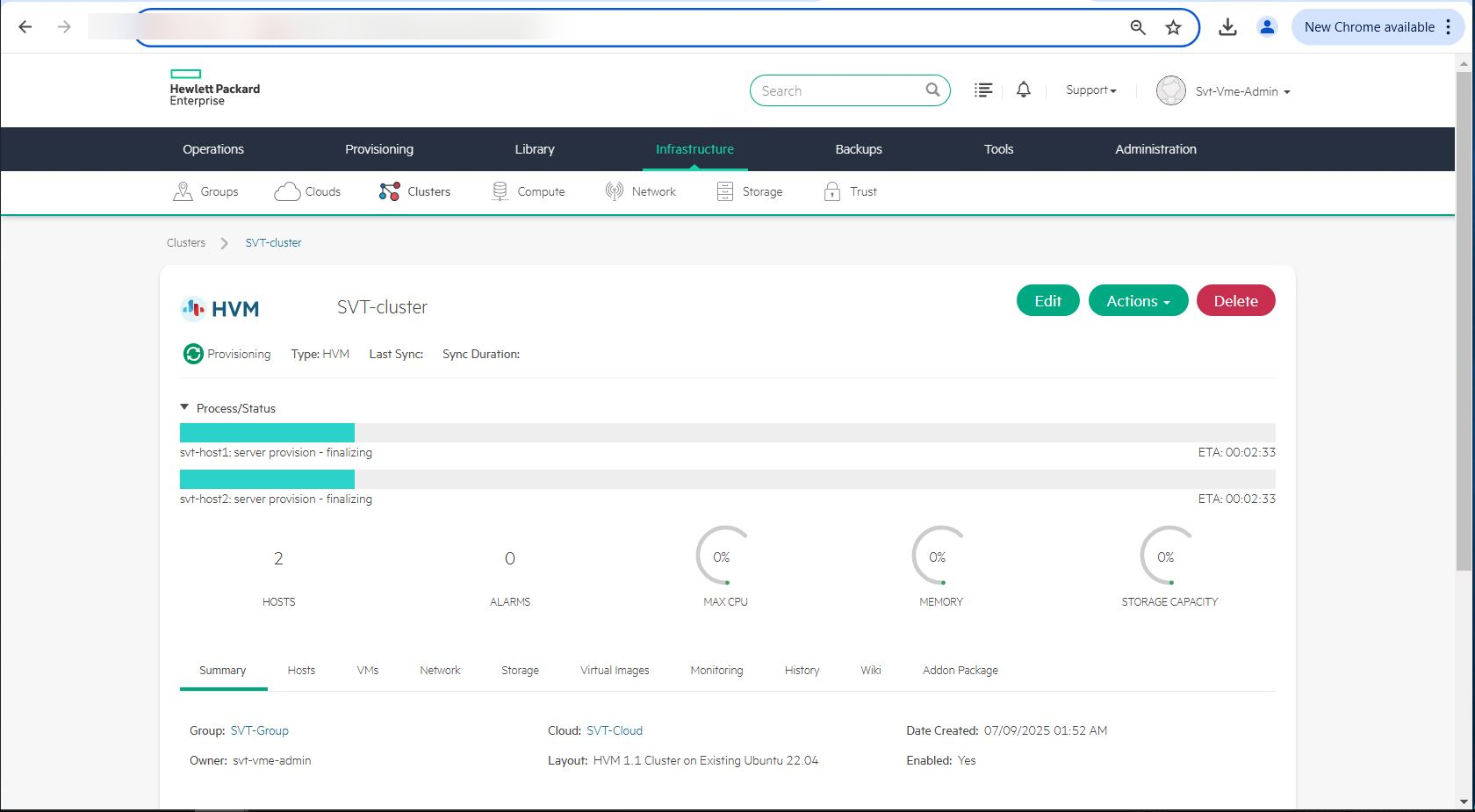
Once finished, all host and cluster statuses turn green (OK), and the unified resilient storage pool becomes ready in the VME Manager dashboard.
6. Post-Deployment Verification CLI Cheat Sheet
Never rely solely on GUI green checkmarks. Log in via SSH to the OVC and run CLI diagnostic commands to verify cluster health:

# 1. Overall federation balance and health
dsv-balance-show

# 2. Node and OVC status check
svt-node-show

# 3. Verify 2-node Arbiter connection (Must state "Connected")
svt-arbiter-show

# 4. Inspect real-time deduplication and storage capacity
svt-datastore-show
7. Real-World Field FAQ & Troubleshooting
Q1. OVC provisioning freezes around 75% and times out.
- Cause: Storage network (10G/25G) MTU mismatch or blocked Arbiter ports (TCP 9999).
- Fix: Run a jumbo ping from the host console to verify MTU integrity:If it fails, audit your upstream switch ports and VLAN MTU settings.
ping -M do -s 8972 <remote_storage_ip>
Q2. If one node powers down unexpectedly, does storage failover immediately?
- Answer: If the Arbiter is
Connected, failover is instantaneous (0 seconds) with no storage disruption to surviving VMs. For planned maintenance, however, always perform a live migration of workloads to the healthy node first.
Wrap-Up
HPE SimpliVity with VME offers a reliable enterprise alternative for modern HCI. Adhering to the fundamentals—strict network isolation, end-to-end jumbo frame verification, and external Arbiter placement—guarantees a smooth, error-free deployment on day one.