1. Background: Why Did the Switch Front Panel Light Up Amber in a Cold Server Room?
During on-site data center maintenance, it is common to observe the SYS/ENV status LED on the front panel of Cisco MDS 9148T (HPE SN6620C) storage switches illuminated in amber (orange), even when the server room ambient temperature is kept at a cool 18–20°C.
When running show environment to inspect internal sensor readings, the temperatures show 32°C (Normal). Despite normal operating conditions, a sensor polling mechanism bug in NX-OS 9.2.2 (such as CSCwo09244) erroneously triggers a threshold warning and illuminates the cosmetic amber warning light.
In this guide, we cover the root cause analysis of the false temperature sensor Amber LED issue, the permanent resolution via the recommended 9.4.5 upgrade , andhow to configure the switch Timezone to eliminate log timestamp confusion during incidents.
2. Environment & Prerequisites
| Item | Specification / Details | Field Rationale |
|---|---|---|
| Target Switch | Cisco MDS 9148T / HPE SN6620C | 32G Enterprise FC SAN Switch |
| Affected Version | Cisco NX-OS 9.2(2) | Known cosmetic temp sensor polling bug |
| Resolved Version | Cisco NX-OS 9.4(5) | Fixes sensor polling and platform monitoring bugs |
| Configured Timezone | Timezone (KST, UTC+9) | Synchronized log timestamp analysis |
3. Step-by-Step Resolution and Configuration Procedure
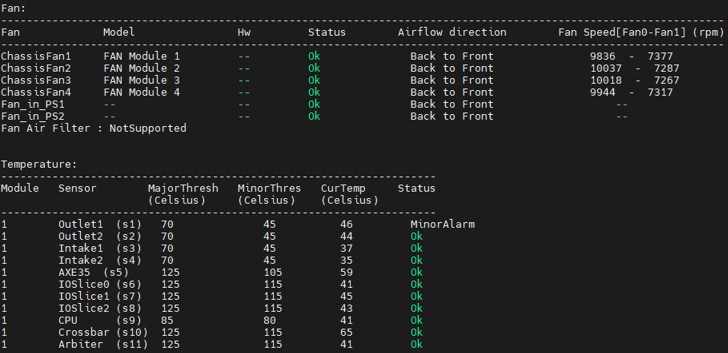
Pre-upgrade switch front panel LED and status inspection
Step 1. Inspect Temperature Sensor & Environmental Health
When the front Amber LED is lit, perform an initial check to determine whether it is a hardware failure or a software bug.
# Detailed check of environmental sensors and temperature info
show environment temperature
If all sensors report OK and temperatures are within the Normal operating range, yet the Amber LED remains lit, you can confirm it is the NX-OS 9.2.2 sensor polling bug.
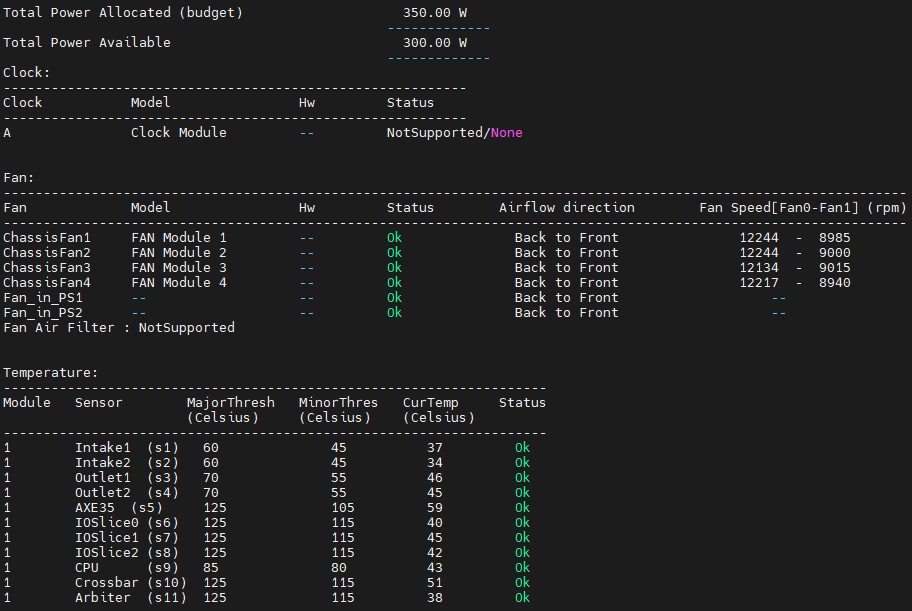
Post-upgrade verification showing normal green LED and show environment sensor validation
Step 2. Permanently Fix Sensor Bug via 9.4.5 OS Upgrade
To resolve the sensor polling bug, upgrade the switch OS to the recommended release NX-OS 9.4(5).
Once the upgrade is complete and the switch reboots, the platform monitoring daemon re-initializes, clearing the amber alarm and restoring the front panel LED to normal Green.
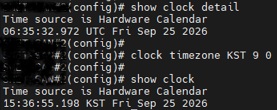
Configuring Timezone (KST, UTC+9) using clock timezone command
Step 3. Configure Switch Timezone
If the switch remains in default UTC (Coordinated Universal Time), cross-referencing switch logs with server and storage logs during incident troubleshooting creates a time gap that complicates root cause analysis.
# Enter global configuration mode
switch# configure terminal

# Set Timezone (e.g., KST UTC+9)
switch(config)# clock timezone KST 9 0

# Verify clock setting
switch(config)# show clock
(Field Rationale: Matching storage SAN switch log timestamps with standard operating time reduces troubleshooting duration by half)
Step 4. Save Running Configuration
Save the running configuration to startup configuration so the timezone setting persists across reboots.
# Save configuration
switch# copy running-config startup-config
4. 🚨 Troubleshooting Notes (Field Realities)
Issue 1: Temperature is Normal (32°C) but Front SYS/ENV LED Remains Amber
- Symptom:
show environmentreports all statuses asNormal, but front panel SYS/ENV LED stays amber. - Root Cause: NX-OS 9.2.2 IOSlice temp sensor polling retry logic bug (
%PLATFORM-4-MOD_TEMPFAILcosmetic malfunction). - Resolution:
- Software reset commands (
clear environment history) do not fix the issue permanently. - Upgrading to NX-OS 9.4(5) completely resolves the issue, restoring the LED to 100% normal Green.
- Software reset commands (
5. Verification Checklist
- Physical Front LED Verification:
- Verify that
SYS,ENV, andFANLEDs on the front panel have changed from Amber to Normal Green.
- Verify that
- Sensor Health Verification:
show environment # Output: Power, Fan, Temp all report OK / Normal - Timezone Verification:
show clock
# Example output: 15:35:12.123 KST Sun Sep 27 2026
6. Field Engineering Best Practices
- Distinguishing Hardware Faults from Software Bugs:
Do not immediately request hardware RMA replacement when the front Amber LED is lit. Always runshow environmentfirst. If sensor temperatures are in the normal 30°C range, it is a firmware sensor polling bug solvable via OS upgrade. - Configure Timezone During Initial Commissioning:
Missing timezone configuration leads to confusion during FC port flapping or link error analysis. Always establish the habit of runningclock timezone KST 9 0during initial setup.
7. Summary
- Core Takeaways:
- NX-OS 9.2.2 false temperature Amber LED issue is permanently resolved by upgrading to 9.4(5).
- Configure standard timezone using
clock timezone KST 9 0. - Persist settings with
copy running-config startup-config.